
TL;DR

Get home office essentials delivered free with Prime
- Fast, free delivery on millions of items
- Prime Video, Amazon Music and more included
- Member-only deals all year
The best window and door alarm sensor kit is the one that fits your openings, connects reliably to your home system, and sends alerts you can use. If you are replacing the Ring Window and Door Sensors six-pack, compare TECKNET Wi-Fi sensors, the Ring Alarm Contact Sensor six-pack, SimpliSafe Entry Sensors, and VOXON’s kit by checking compatibility, alarm behavior, battery details, and total coverage before you buy.
The older Ring Window and Door Sensors six-pack appears discontinued or unavailable, but its status may vary; verify current availability and exact model detai…
The Ring Alarm Contact Sensor is a separate listed product, so confirm hub and generation compatibility rather than relying on the Ring name.
Measure frame gaps and check mounting directions; dimensions alone do not prove that a sensor will fit or trigger reliably.
Separate local sirens, app alerts, and professional monitoring when comparing what a kit can do, including during internet or power outages.
Count the openings you want to protect and include hub, battery, expansion, and subscription costs in your comparison.
Start with the opening you need to protect
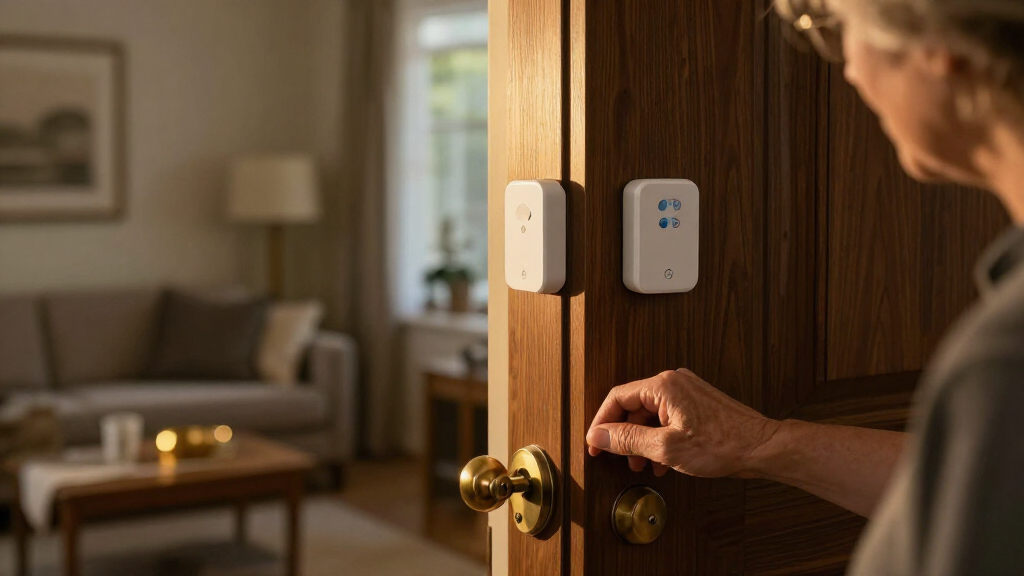
A **window or door alarm sensor** detects movement at an opening and reports it through a local sound, a phone notification, a hub, or a monitored service, depending on the model and setup. A common contact sensor has two pieces: one on the frame and one on the moving panel. Open the window and the pieces separate; click, the system registers the event. That simple action is the whole job of a contact sensor. The best window and door alarm sensor kit for a small apartment may be a basic local alarm, while a larger home may need sensors connected to a hub and phone app. The difference matters because each alert path depends on something: a local sound needs someone nearby to hear it, while a remote notification relies on the sensor reaching a hub or network and the alert reaching your phone. For example, if you mainly want a sharp chirp when a basement window opens, an audible standalone unit may meet that goal. If you want to know when a side door opens while you’re at work, you need a system with remote alerts and a working communication path. Contact sensors do not detect every security event. A sensor on a closed window generally won’t report that glass has cracked if the frame and panel remain together; a separate glass-break sensor addresses a different event. That distinction affects both coverage and cost: adding another sensor can address a blind spot, but it also adds installation, batteries, and upkeep. A camera, motion sensor, smart lock, or professional monitoring service can add other functions, but each adds setup, cost, and data considerations. > A sensor reports movement; it does not physically secure the opening. Pair it with sound locks and sensible home security practices, and test it after installation.Products Worth Considering

FLEXISPOT 36-Inch Standing Desk Converter, Black

LG PuriCare AeroHit Smart Air Purifier for Large Rooms up to 1000 sq ft, True HEPA Filter with 360° Airflow, PM1.0 Sensor & LED Air Quality

FLEXISPOT 60 x 30-Inch Bamboo Electric Standing Desk with White Frame
As an affiliate, we earn on qualifying purchases.
Compare four replacements before choosing a six-pack
If you want a direct replacement for the Ring six-pack, begin by comparing the connection method, package size, and system dependencies. The Ring Window and Door Sensors six-pack appears discontinued or unavailable, but this is not certain and availability may vary. Its listed specifications include six sensors, two CR2032 batteries per sensor, and an estimated battery life of up to three years. It used Amazon Sidewalk or Z-Wave, with a base station required for Z-Wave [1]. The alternatives below overlap on some specifications, but no single option matches every detail. The connection method can determine whether a kit works with equipment you already own or requires a new hub, while pack size affects how many openings you can cover in one purchase. A shared brand name does not prove that a newer sensor works with the older product’s hub or service. Check the exact model and required hub before buying. Use the table as a shortlist, then verify current product pages and regional details.| Option | Listed connection and power | Pack and other listed details |
|---|---|---|
| TECKNET Wi-Fi Door and Window Alarm Sensors with Chime | 2.4 GHz Wi-Fi; two AAA batteries per sensor, not included | Two-pack; listed dimensions 4.1 × 1.4 × 0.6 in; 36-month warranty with registration required |
| Ring Alarm Contact Sensor, 2nd Gen | Z-Wave; listed range up to 250 feet to a Base Station in open air, line of sight | Six-pack; listed dimensions 1.56 × 2.09 × 0.55 in; estimated three-year battery life; one-year limited warranty and service |
| SimpliSafe Entry Sensor | Wireless; confirm supported system and functions for the exact model | Four-pack; listed dimensions 0.12 × 2 × 2.7 in; one-year warranty |
| VOXON Door & Window Alarm Kit | Connectivity and battery details not specified in the supplied comparison | Four-pack; listed dimensions 0.8 × 5 × 2.6 in; 36-month warranty |
Check compatibility before you trust a familiar brand name
The best window and door alarm sensor kit must connect to the system you want to use, and a brand name alone cannot tell you that. One Ring sensor generation may rely on different communications or system requirements than another. The supplied specifications list the older Ring Window and Door Sensors as using Amazon Sidewalk or Z-Wave, with a base station required for Z-Wave; the Ring Alarm Contact Sensor is listed as Z-Wave and intended to connect to a Base Station [1]. Confirm exact model support before treating them as interchangeable. This check can prevent a costly mismatch: a sensor may use a familiar radio protocol but still fail to appear in the app or support the alarm behavior you need. A homeowner with an existing hub should write down its model and the sensor’s model number, then verify that the hub supports that exact sensor. A renter with no hub should ask whether the sensor works independently, needs a panel, or depends on a Wi-Fi app. The phrase “smart home compatible” may describe only selected features or platforms, not every alarm function.- Identify the sensor model and generation. Save the manufacturer’s model number; product names can be similar.
- Check the required connection. Look for Wi-Fi frequency, radio protocol, hub or panel requirements, and supported range.
- Confirm the functions you want. Verify local chimes, phone alerts, automation, event history, and monitoring separately.
- Ask what happens offline. Find out whether the sensor can still alert locally if Wi-Fi or internet service drops.
- Test after setup. Open each protected door or window and confirm the expected alert reaches the right place.
Measure each frame so the sensor can close and open cleanly
A sensor that does not fit the frame reliably can miss the very opening you meant to monitor. Before choosing a kit, measure the gap between the fixed frame and moving panel, then compare it with the manufacturer’s permitted sensor gap and mounting directions. This gap matters because the two pieces have to stay close enough when the opening is shut and separate far enough when it opens. Check whether the sensor pieces stay aligned as the window or door moves. A few millimeters can matter when a narrow sash slides past a thick frame. Picture a sliding patio door with a metal frame. The main opening may have enough room for a large sensor, while the screen door’s narrow rail does not. Adhesive may also behave differently on dusty, textured, cold, or damp surfaces. If a sensor shifts, its readings can become unreliable even though the door itself works normally. Follow the mounting instructions; where screws are allowed and practical, they may hold more securely than adhesive, but a renter may need a removable method that will not damage the finish. Product size can help you rule out awkward fits, but dimensions alone do not establish the required separation or orientation. The supplied comparison lists the TECKNET sensor at 4.1 × 1.4 × 0.6 inches and the Ring Alarm Contact Sensor at 1.56 × 2.09 × 0.55 inches. A smaller body may suit a tight frame, but it still needs a mounting position that keeps both pieces aligned throughout the door or window’s movement. Check the gap and orientation for the specific device before settling on a kit. Do a slow test before relying on the installation. Close the opening, verify the sensor reports closed, then open it fully and check for an alert. Repeat the test at the actual mounting point. If a window tilts inward for cleaning, or a door rattles in the wind, make sure that movement will not repeatedly trigger the sensor or loosen its mount. A test at the final position can catch a fit problem that measuring the sensor on a table cannot.Choose alerts that work when you are actually away
An alarm’s useful response depends on where the alert comes from and whether the communication path is working. A built-in siren can make noise in the home; a hub can sound an alarm; an app can send a remote notification; a monitoring service can route an event to a response provider. These are separate features because each reaches a different person and depends on different equipment. A door alarm sensor may include one, several, or none of them by itself. Suppose a back window opens while you are in the garden. A local chime might be enough to get your attention. If you are across town, a phone notification is more useful, but it depends on power, sensor-to-hub connection, internet access, cloud service, and your phone’s notification settings. If any link fails, the alert may not reach you. If you mute the app at night, the alert may arrive quietly while you sleep. Test the whole chain instead of assuming “app connected” means “you will hear it.”| Alert path | What it can do | What to check |
|---|---|---|
| Sensor or hub siren | Warn people nearby with audible sound | Which device makes the sound, volume rating, and whether the alarm still works offline |
| Phone notification | Tell you remotely that an opening changed state | Hub, internet, cloud, app permissions, and phone settings |
| Professional monitoring | Route qualifying events to a monitoring service | Subscription, response process, supported sensors, and outage backup |
Treat battery estimates as planning guides, not promises
Battery life varies with the product, signal conditions, how often the opening moves, and the manufacturer’s testing assumptions. The supplied specs estimate up to three years for the older Ring Window and Door Sensor and three years for the Ring Alarm Contact Sensor, but “up to” is not a guarantee for every home. The TECKNET option lists two AAA batteries per sensor, not included, while battery life is not specified in the supplied details [1]. The difference matters when planning upkeep: a battery estimate does not tell you exactly when a sensor will need attention, and missing battery-life information makes replacement timing harder to anticipate. A sensor on a busy kitchen door may transmit more often than one on a seldom-used basement window. A weak radio link can also affect battery use. If the hub sits at the far end of a long house behind brick walls, a sensor may struggle more than one in the next room. Low-battery reporting can help you plan a replacement, but check whether the alert appears in the app, on the hub, or only after performance has already weakened. For a practical example, imagine leaving for a two-week winter trip. Before you go, review battery status, test the doors, and check whether you have the correct replacement cells on hand. If battery information is vague, testing and checking status becomes more important than relying on a calendar estimate alone. Coin cells and AAA batteries are easy to find in many shops, but the exact type and count per sensor vary. Keep a note of the model and battery type inside a household maintenance folder. A battery estimate should sit alongside a broader reliability check: signal strength, tamper alerts, event history, and the ability to test each sensor. One sensor with a fresh battery can still fail to report if it has detached, shifted out of alignment, or lost connection. Set a recurring reminder to test the system, especially after changing batteries, moving a hub, or rearranging furniture around the signal path.Count openings first, then compare total system costs
The number printed on a kit tells you how many sensors come in the box, not whether the kit covers your security plan. Walk through the home and list the accessible doors and windows you want to monitor. Include the side entrance, basement window, and patio slider if those openings matter to you. Then compare the count with the pack size and check how many sensors your hub can support. This keeps a low per-sensor price from disguising the cost of buying another pack or adding a hub. A simple example: a two-bedroom ground-floor apartment has one front door, one patio slider, and three windows facing a shared walkway. That is five openings. A four-pack leaves one uncovered, while a six-pack may provide a spare; a two-pack could still be suitable if the resident only wants alerts on the door and slider. The right answer follows the household’s priorities, not the largest box. A spare can be useful if a sensor fails or priorities change, but it is not useful coverage unless it is installed and maintained. Budget beyond the initial kit. Extra sensors, a hub, batteries, professional monitoring, cloud services, or a subscription may add recurring or one-time costs. Those costs can make a cheaper kit more expensive over time, especially if it depends on a hub or subscription you do not already have. A local-only alarm can avoid a monthly service fee, but it may not send remote notifications. A connected kit can offer richer automation, yet it may depend on an account, internet access, and data practices you should review.- List every opening you want to protect and rank them by access and concern.
- Match the opening count to the sensor pack, including any spare units.
- Check hub capacity and the cost of expansion sensors.
- Write down batteries, subscriptions, monitoring, and hub requirements.
- Decide which features matter enough to justify ongoing costs.
Know what a contact sensor cannot tell you
A contact sensor reports a change in the relationship between its two pieces; it does not prove that the home is safe. It cannot stop a forced entry, detect every broken window, or guarantee that a notification reaches you. The sensor can be bypassed, misaligned, removed, depleted, or disconnected. Each failure can make the system appear quiet for a different reason, so a successful installation is only the start: you also need to test it and maintain it. Use it as one signal in a broader plan, alongside sound locks, secured frames, lighting, and other measures suited to the property. A classic limitation appears with glass. Someone could break a pane while leaving the window frame shut, so the contact sensor may not see the event. A separate glass-break sensor is designed for that type of sound pattern, while a motion sensor detects movement in an area. Neither is a drop-in substitute for a contact sensor; each catches a different event. A layered system may help, but it also creates more devices to install, power, and maintain. Consider the likely gaps in your coverage before adding equipment, so the extra cost addresses a real limitation. Connectivity brings privacy tradeoffs. App-connected products can create accounts and transmit household activity data, such as when a door opens. Review account security, software update policies, data practices, and what features stop working if internet service or a subscription ends. Use a unique password and available account protections, and limit shared access to people who need it. These checks matter because access to event history can reveal household routines, while a service change can affect the alerts you rely on. For a family with a young child, the most valuable setting may be a local door chime that sounds whenever the back door opens, rather than remote monitoring. For someone who travels frequently, remote alerts and backup power may matter more. The best setup depends on how you live. Test the sensor, understand its blind spots, and pair it with measures that address those gaps.Frequently Asked Questions
Do window and door alarm sensors need Wi-Fi?
No, not always. Some sensors use a dedicated hub or security panel, and some can sound a local alarm without internet. Remote app alerts or cloud features may rely on Wi-Fi and internet access, so check what still works during an outage.
Will a Ring Alarm Contact Sensor work with my older Ring sensors or hub?
Check the exact models and hub. The supplied details list different communication descriptions for the older Ring Window and Door Sensors and the Ring Alarm Contact Sensor. Similar names do not confirm compatibility, so verify supported models and functions with the manufacturer before purchasing.
Can I install sensors on sliding windows and doors?
Often, if the sensor fits and stays aligned. Measure the frame-to-panel gap and check the manufacturer’s allowed spacing and orientation. Test the opening several times after mounting, since sliding panels and narrow rails can shift or leave little room for the sensor.
Do contact sensors detect broken glass?
Usually not. A standard contact sensor detects separation of its two pieces when the opening moves. A separate glass-break sensor is designed for the sound of breaking glass and covers a different event.
Do these alarm sensor kits require a subscription?
Basic local alarms may work without one. Professional monitoring, cloud storage, or advanced app features can have recurring fees. Check which functions stop if a subscription ends, and whether the sensor still provides a local chime or siren.